A marketing team can know exactly what it should do and still struggle to get it done. Campaign data needs checking, useful research sits in bookmarks, and a thoughtful sales follow-up becomes another generic reminder.
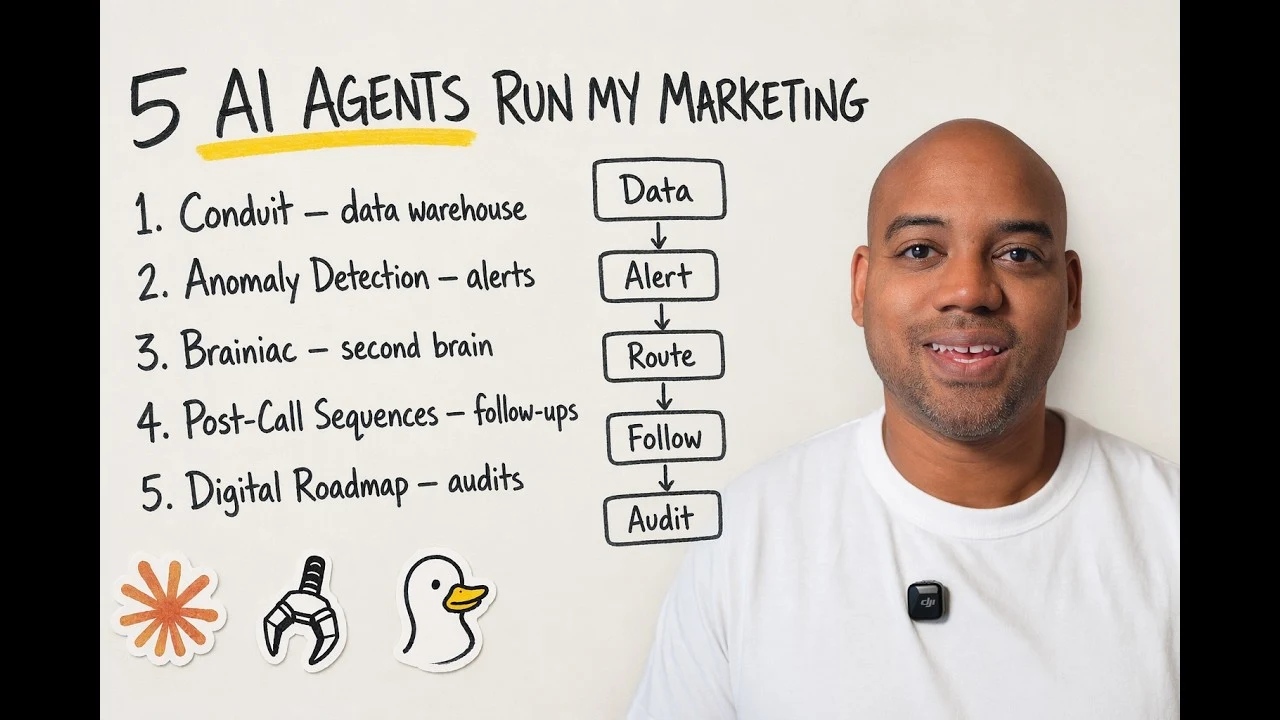
AI agents can help with those repeated tasks. The strongest use cases start with a defined workflow, dependable inputs, and someone responsible for reviewing the result. In the accompanying video, Orrett Davis walks through five systems used in his marketing work and the practical limitations that come with them.
The useful lesson is how the work is organized. A collection of prompts becomes more valuable when it connects to a process the team already needs to run.
1. Put marketing data in one place before asking questions
The first workflow brings advertising and website event data into a shared warehouse. In the video, that system is called Conduit. It uses scheduled data collection and a local DuckDB database so the team can ask questions across sources without opening several dashboards for every investigation.
That changes the starting point for a review. Instead of manually assembling a report, a marketer can ask how acquisition costs changed, which creative needs attention, or how this week’s spend compares with the previous period.
The quality of the answer still depends on the data underneath it. Before using an agent’s analysis, check:
- Which accounts and channels are included.
- The latest successful refresh for each source.
- The date range and attribution definitions.
- Whether conversions represent leads, meetings, opportunities, or revenue.
An agent cannot resolve inconsistent definitions simply by writing a confident summary. Connecting campaign activity to meaningful business events is the foundation, as covered in the conversion tracking checklist.
A useful first version is a narrow reporting question with a reproducible calculation. Add more sources once the team can trace the answer back to the underlying records.
2. Monitor changes that deserve attention
The second system checks for unusual changes in campaign and funnel activity. The examples in the video include falling form completions, rising acquisition costs, and conversion rates moving away from their usual range.
This is a different job from producing a weekly report. Reporting explains a period of activity. Monitoring identifies something that may need investigation while it is happening.
A practical alert should name the affected metric, show the comparison period, and point to the evidence. A notification that simply says performance is down creates another investigation task without much help.
Monitoring also needs to distinguish a business problem from a measurement problem. Fewer recorded submissions might mean fewer leads, a broken form, an incomplete data refresh, or a tracking change. Treat the alert as a prompt to investigate, not an automatic instruction to pause a campaign.
The CRM revenue visibility guide helps define which downstream outcomes are useful inputs for that monitoring.
Start with a few consequential events. If every small fluctuation triggers a message, important warnings become harder to spot.
3. Turn saved research into usable project context
The third workflow, called Brainiac in the video, organizes material that would otherwise disappear into a bookmark folder. An article or video is ingested, assessed for relevance, connected to an active project, and made searchable later.
The important step is the connection to current work. A useful creative reference should reach the person or workflow developing creative. A technical note should reach the process it affects. An interesting but unrelated article can remain reference material.
A simple intake record can capture the source, the relevant idea, the project it may help, and a proposed use. Keeping those fields separate prevents an opinion from a source from silently becoming an instruction for the whole business.
Research becomes useful when it changes a decision or helps someone perform a task. The goal is not to accumulate the largest possible archive.
4. Draft sales follow-up from the actual conversation
Generic follow-up often asks a buyer to do more work without giving them anything new. A transcript-based workflow can instead identify the pain points, objections, comparison questions, and next steps raised during the call.
Those details provide material for a relevant sequence. If a prospect asked about implementation, the next message can answer that concern. If they compared two approaches, it can explain the difference that matters to their situation.
The video shows an agent preparing several messages from a sales conversation. The practical safeguard is to review them against the transcript before sending. Check names, numbers, promises, deadlines, and any description of what the prospect agreed to do.
Personalization should reflect what was said. It should not invent a concern, exaggerate buying intent, or imply a commitment that never happened. A shorter accurate sequence is more useful than a longer sequence built on assumptions.
5. Build audits through research, synthesis, and review
The final workflow assembles a tailored marketing audit from several tasks. Website review, competitor research, advertising research, and customer context inform recommendations about campaigns, creative, and landing pages.
Breaking the work into stages helps each task stay focused. Research establishes what can be observed. Analysis identifies likely problems or opportunities. Drafting turns those findings into something a team can use.
A review stage then checks whether the recommendation is specific, supported, and relevant. In the video, Orrett describes early outputs containing fabricated metrics and generic advice. That is a useful reminder that a polished document is not proof of a sound audit.
For every recommendation, ask what evidence supports it, what remains uncertain, and what the team should do next. The same principle applies to the B2B marketing lessons for growing companies: clearer priorities matter more than adding tools for their own sake.
Start with one workflow you can inspect
These systems still require maintenance. Data collection can fail, models can be unavailable, and agents can produce incorrect conclusions. The video explicitly describes that operational messiness alongside the benefits.
Choose one recurring task with a clear input and output. Define a useful result, establish a review step, and make failures visible. Expand the agent’s responsibility only after it reliably completes that task.
Watch the original walkthrough of five AI agent marketing systems on YouTube for the examples and discussion of what still needs human judgment.
FAQ
Do marketing teams need a fully autonomous agent?
No. A chat assistant, a collaborative drafting workflow, or a small reporting script may solve the immediate problem. The level of autonomy should match the task and the team’s ability to review it.
What is a useful first AI marketing workflow?
A bounded reporting or research task is a practical starting point because its inputs and output can be checked. Define the question and the evidence needed before connecting more systems.
Can an AI agent make campaign decisions without review?
An agent can prepare analysis and recommendations, but those recommendations still depend on accurate data and sound interpretation. Set clear approval boundaries for budget changes, publishing, and external communication.
How do you reduce fabricated insights?
Require traceable source material, separate observed facts from interpretations, and review numbers against the original data. A second review step helps, but it does not replace verification.
Want to identify the marketing workflows that deserve attention first? GET MY FREE PIPELINE AUDIT.